LAB/ Software 03 · Browser extension + Studio
AfterClick
What happened
after you clicked?
An interface flight recorder. Record a real website interaction with a local Chrome extension, then read the action-to-state relationships in a Studio built for inspection, annotation, and evidence.
- Platform
- Chrome MV3
- Captures
- DOM + ARIA
- Storage
- Local Chrome
- Network
- None
Not a bug tracker. A record of consequence.
AFTERCLICK exists for one question designers and developers ask constantly: what happened after I clicked? It records the action, opens a measured observation window, and captures the interface states that follow. The result is not a screen recording or a generic analytics dashboard. It is a sequence of actions, observed DOM/ARIA changes, measured delays, and honest gaps.
The extension records one tab at a time, only after you press Start and confirm consent. The Studio is a separate local workspace: import the exported JSON, inspect the timeline and the state map, add annotations, and export a report. Files move between the two experiences as portable JSON. There is no account, backend, or hidden live connection.
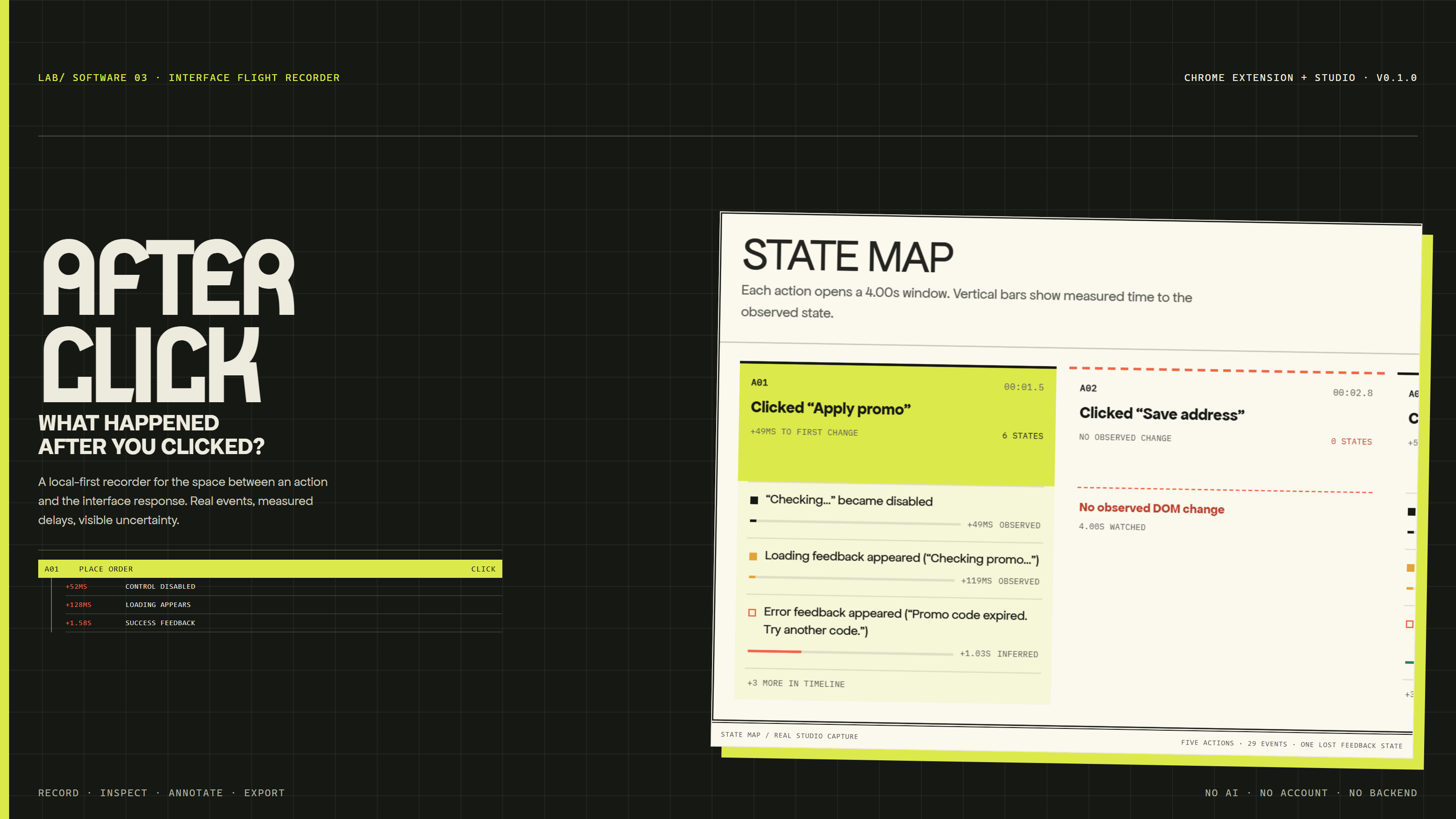
The bundled sample is a real capture from a local checkout fixture: five actions, 29 events, three pieces of feedback, and one action that produced no observed DOM change. The last one is not a failure to hide. It is the finding.
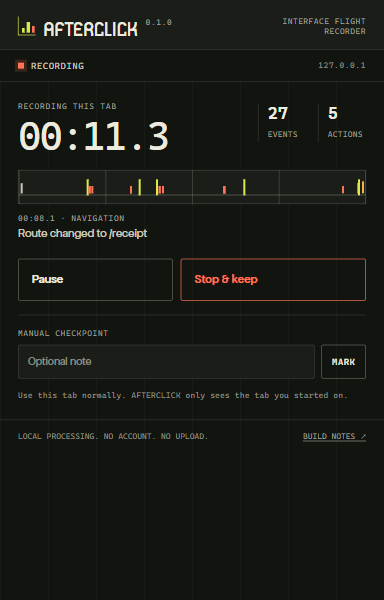
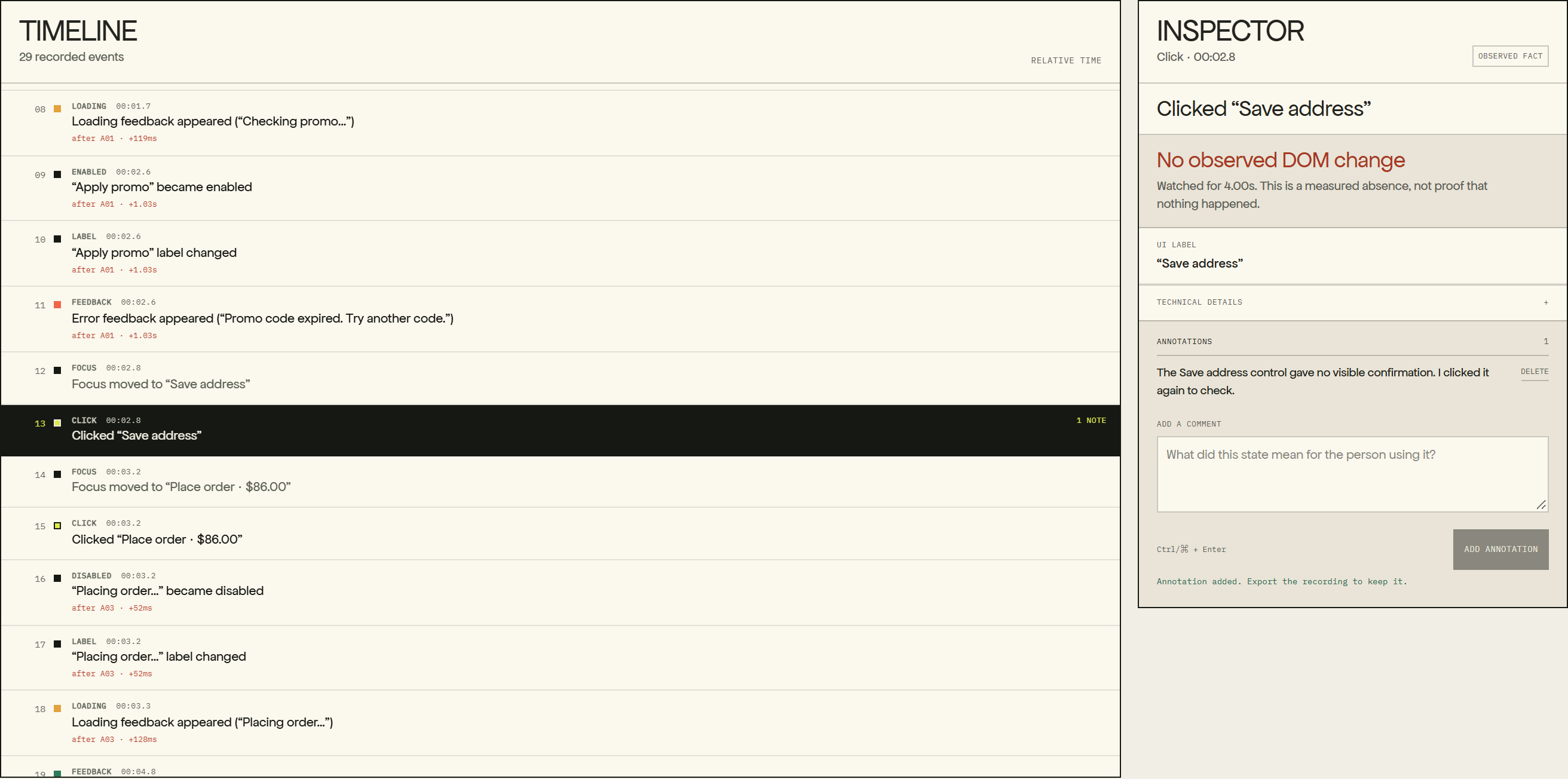
These are browser-rendered captures of the built interfaces. The popup capture comes from the automated Chromium acceptance run against the local fixture. The Studio capture uses the bundled sample recording.
A click occurred. A button gained disabled. An alert appeared in the DOM. The path changed to /receipt.
“Success feedback” from live-region text or an error class is a heuristic. It is dashed in the map and marked inferred in the inspector. It can be wrong.
A checkpoint or annotation is a person’s judgment. It is stored separately, survives export, and is never presented as something the recorder detected.
A narrow pipeline with explicit edges.
Starting a recording injects one content script into the active tab using activeTab and scripting. A background service worker owns the session, assigns sequence numbers, measures each event against the start time, and persists the active recording in chrome.storage.session. The completed recording is kept in chrome.storage.local until you clear it or export it.
The content script captures capture-phase clicks and form submits, focus changes between interactive controls, and keyboard shortcuts only when they include Ctrl, Meta, or Alt, plus Escape. There is no character-key listener. Typed content is never read. SPA route changes are detected by watching the URL, not by claiming access to framework internals.
A MutationObserver watches attributes and subtree changes while an action’s observation window is open. It records disabled and enabled transitions, aria-busy, progress indicators, dialogs, live regions, short control labels, and classification-ready feedback. Other mutations are ignored rather than logged indiscriminately.
“+1.59s” means 1.59 seconds elapsed between the action and the first qualifying DOM/ARIA change that the recorder observed. It is not network latency, frame time, input latency, or perceived responsiveness. The popup displays wall-clock elapsed time, including pauses, and the timeline keeps pause/resume events.
- Clicks, form submits, modifier shortcuts, focus
- Navigation and same-document route changes
- Disabled, loading, dialog, label and feedback states
- Manual checkpoints
- Form values, passwords, typed characters
- Cookies, headers, network payloads
- Screenshots (not implemented in v0.1.0)
- Canvas/WebGL pixels, iframe interiors, closed shadow DOM
- Cross-origin navigation can end capture
- The partial recording stays exportable
- Tab close finalises the recording
- Browser settings pages are blocked
A map of consequence, not a chart of clicks.
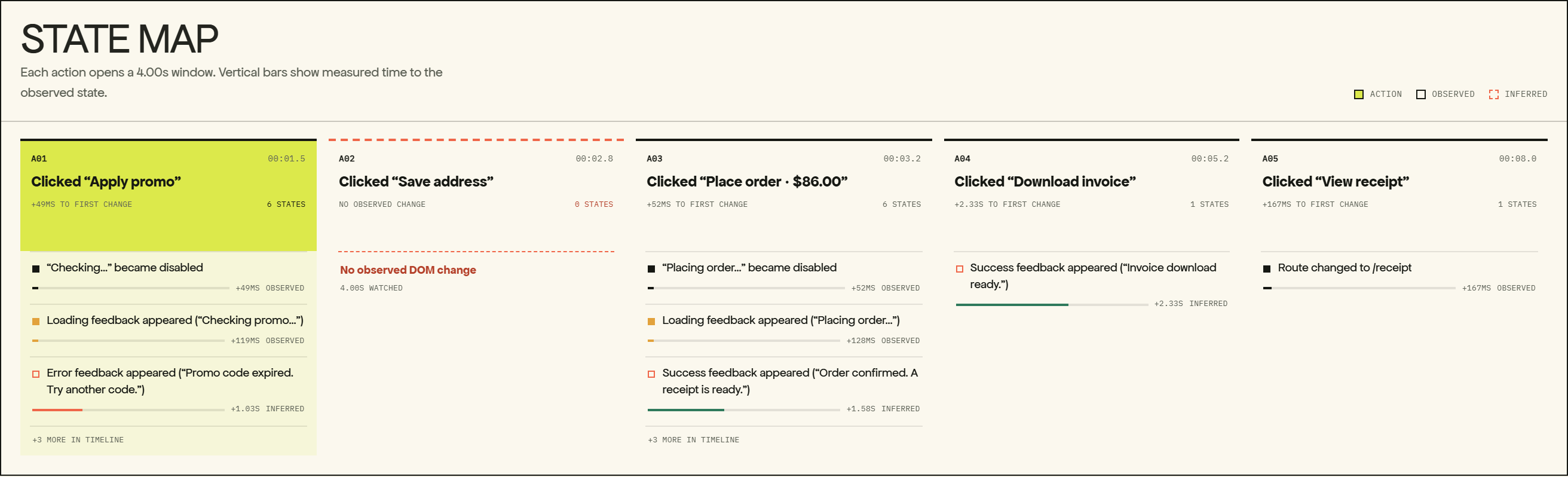
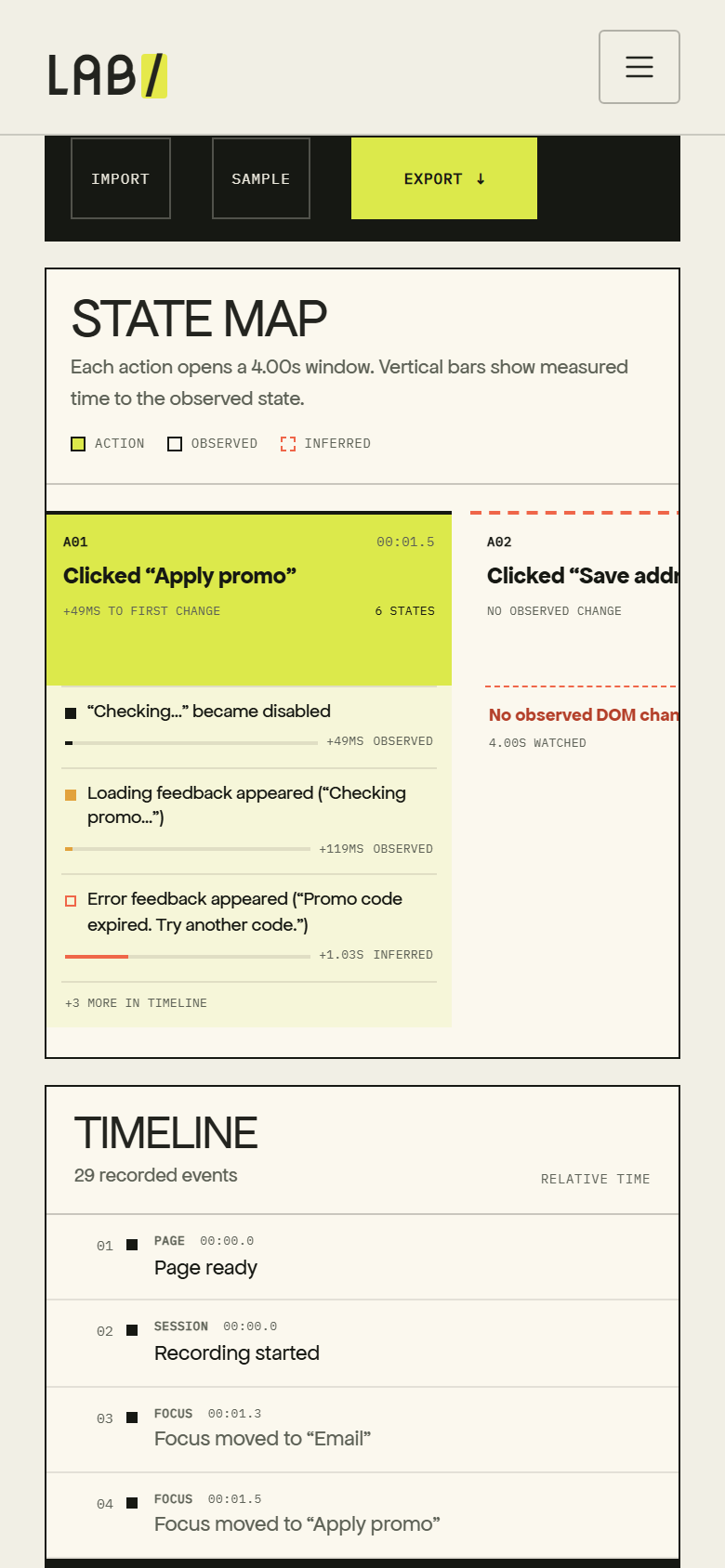
Every action becomes a column. Its observed states stay in measured order, each with a short delay bar scaled to the observation window. The first column is not the most important one; it is simply the one that happened. Selection is shared with the timeline and inspector, so the map is a working index rather than an illustration.
The gesture opens a window.
A click, submit, or modifier shortcut starts a four-second observation period. The action keeps its real target label, tag, role and a short structural selector.
Time becomes a bar.
Each state carries a delay bar scaled to the observation window. The printed +ms label is the measurement; the bar is a quick visual comparison, not a precision instrument.
Uncertainty has a texture.
Solid borders are observed facts. Dashed coral borders are inferred labels. A dashed stem ending in “0 observed DOM changes” is a measured absence.
“Save address” produced no qualifying DOM change across four seconds. The map does not invent a success state. It shows the absence and sends you to the inspector, where an annotation can record what the missing feedback meant.
What the map refuses to say: correlation is not causation. An unrelated toast during the window can be attached to the action. The recording marks its evidence and leaves the judgment to the person reading it.
Import the evidence. Argue with it.
The Studio is a standalone browser interface. It opens with a real sample recording, so the timeline and state map are useful before the extension is installed. Importing a file replaces the sample. A malformed file, a future schema version, or an empty recording is explained without destroying the recording already on screen.
Selecting a node in the map, a row in the timeline, or a consequence in the inspector keeps all three in sync. Arrow keys move through the timeline; Home and End jump to its edges; the annotation field submits with Ctrl/⌘ + Enter. On mobile the map scrolls horizontally and the inspector stays reachable.
Portable recording
Schema-versioned, with stable event IDs, timestamps, observed changes, evidence labels, consent metadata, and annotations. Imports round-trip through the Studio parser.
Interaction report
Rendered from the recording on an offscreen canvas: action ledger, measured delays, evidence texture, annotations, and a privacy footer. No screenshot montage.
Self-contained report
A single file with inline CSS, the consequence map, annotations, and the full event table. No scripts, remote styles, fonts, or images are loaded.
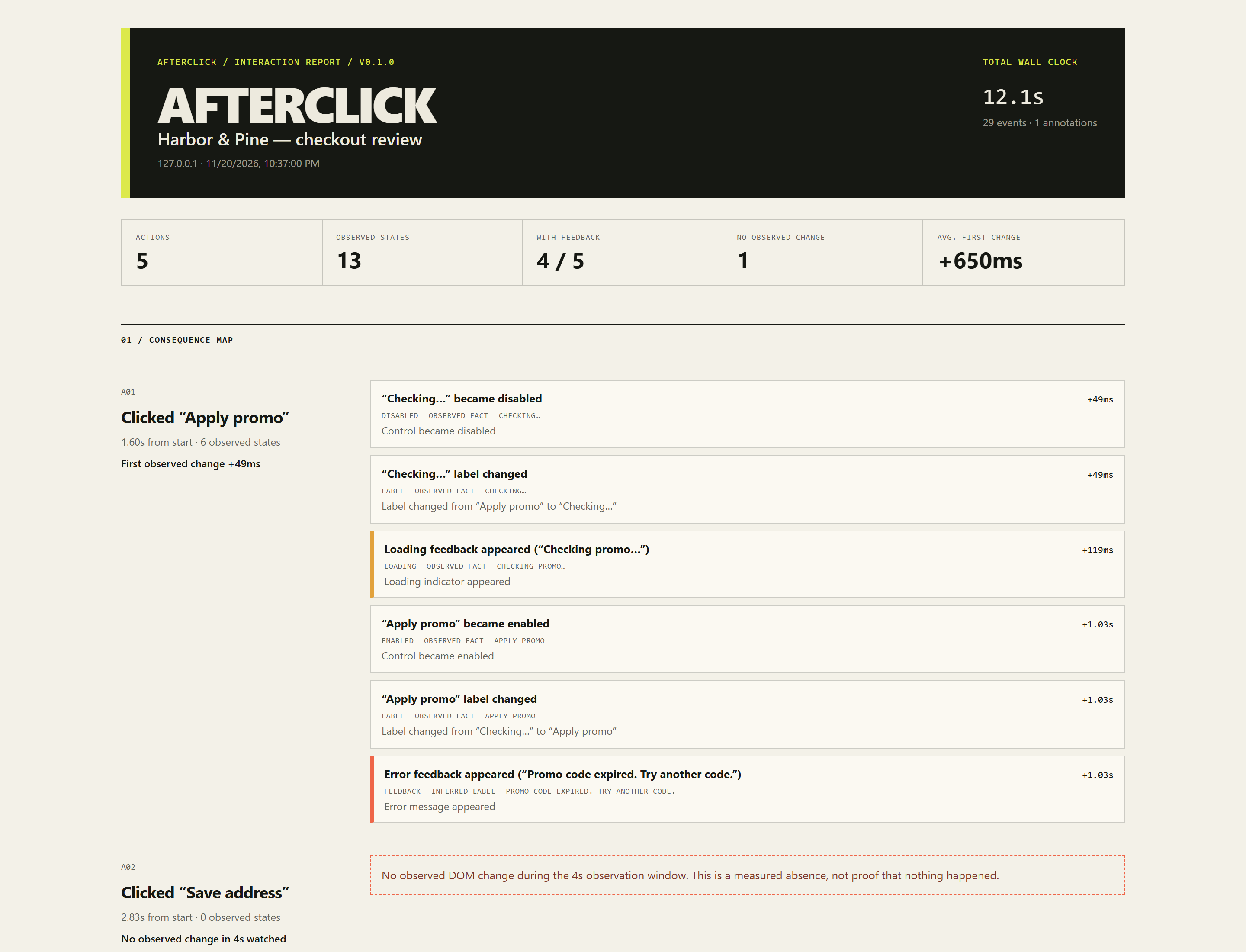
The sample is stored as a portable recording, not a fabricated screenshot. Its source is the local Harbor & Pine fixture and its form values are deliberately fake; automated privacy checks confirm those values are absent from the exported JSON.
Load it unpacked. Keep it local.
- Download and extract. Get afterclick-v0.1.0.zip and unzip it into a folder you can keep. The folder must contain
manifest.json. - Open the extensions page. Go to
chrome://extensionsin Chrome or another Chromium browser. - Enable Developer mode. Turn it on in the top-right corner, then choose Load unpacked.
- Select the extracted folder. AFTERCLICK v0.1.0 appears in the list. Pin it to the toolbar for the reliable start path.
- Record and export. Open a normal
https://page, open AFTERCLICK, confirm consent, and press Start. Pause, checkpoint, or stop from the popup. Export the JSON and import it in the Studio.
node extensions/afterclick/tools/build.mjs
node extensions/afterclick/tools/package.mjs
node --test tests/afterclick.test.ts
node scripts/afterclick-acceptance.mjs
node scripts/afterclick-studio-qa.mjs
The ZIP is a developer build. It is not signed, not submitted to the Chrome Web Store, and not tested in Firefox or Safari. A human toolbar-install pass is still required before any store submission.
- TypeScript + Next production buildPassing
- AFTERCLICK unit tests15 passing
- Studio browser QA30 / 30
- Extension acceptance35 checks
- Listing + docs browser QA36 / 36
- Manual toolbar installNot automated
- Chrome Web StoreNot submitted
manifest.jsonMV3background.jsservice workercontent.jsrecorderpopup.html/css/jsinterfaceicons/4 sizesfonts/OFL assetsREADME.txtinstallPRIVACY.txtdata
Test method, stated plainly. Chromium does not expose its toolbar to Playwright, so the acceptance harness loads a copy of the build with a localhost-only host permission. The shipped manifest remains minimal. The capture pipeline, background worker, popup state, export, and privacy checks were exercised; the physical toolbar click was not automated.
A real v0.1.0, labelled honestly.
v0.1.0 · Chrome extension + Studio
Manifest V3 extension with explicit per-recording consent. One-tab capture of clicks, form submits, modifier shortcuts, focus, navigation, and SPA route changes. Mutation-based observation of disabled, loading, dialog, label and feedback states. Manual checkpoints. Pause/resume. Session and last recording local storage. Portable JSON export.
Studio with a real sample recording, action-consequence state map, keyboard timeline, event inspector, annotations, malformed and incompatible file handling, JSON round-trip, PNG canvas report, and self-contained HTML report. Automated capture, privacy, state-machine, import/export, accessibility, and responsive checks.
Deliberate omissions
No screenshots, no form values, no character keystrokes, no cross-tab capture, no cloud sync, no accounts, no AI analysis, no Chrome Web Store listing, and no live extension-to-Studio bridge. The JSON file is the handoff.
Before any public listing
Manual toolbar-install QA in current Chrome, Edge, Brave, and Arc; a privacy review of exported UI labels; larger-session stress tests; final store screenshots and listing copy; and the owner’s explicit publication approval.
Record the click.
Read the consequence.
The developer build and the Studio are ready now. Import the sample, inspect a real missing-feedback state, and export the evidence.